WiFi Cartography
Last updated
If there's one thing I've learned in my short time here, it's that the internet is pretty important and that it's only getting more importanter as time goes on. As a prime example of the criticality: Sonja uses the internet to watch Ms Rachel.
Although the State Department does a ton of heavy lifting in providing turnkey housing, they do not set up our internet for us, so we're on our own! I worked with my mom to navigate the bureaucracy of Peruvian telecom companies and eventually got Claro to come out and run fiber to our apartment.
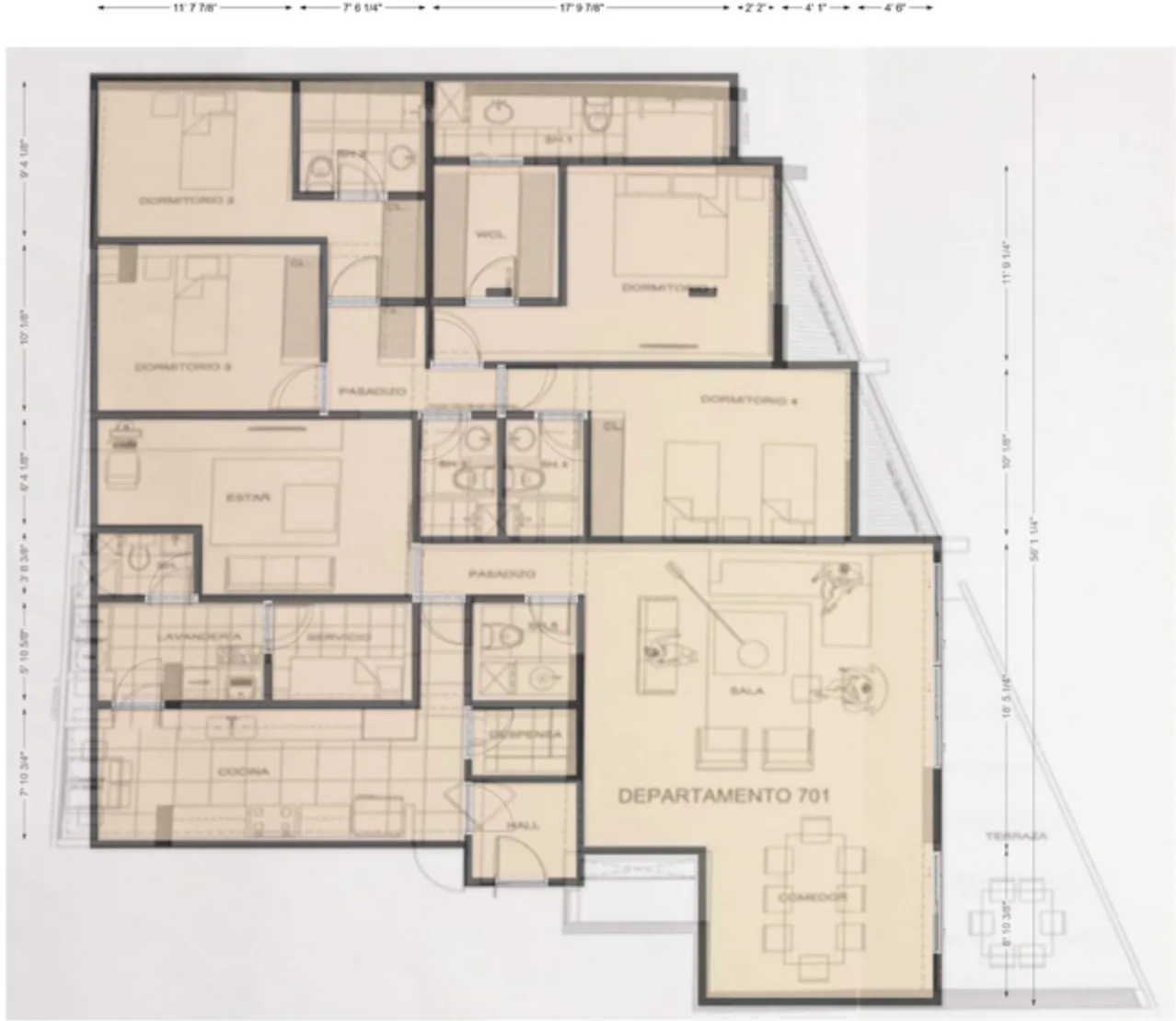
When Sonja tried to watch YouTube from the couch in the living room, I heard about the next problem: wifi was basically unusable everywhere except the playroom. Our house here has thick (reinforced?) concrete walls, which apparently is great for withstanding the occasional earthquake but is quite terrible for any sort of practical networking, be it WiFi or ability to route cables through the house. I worked with my dad to get some data on the problem and created a plan to resolve this major issue plaguing the family.
Setups
We've gone through three different network setups in an attempt to make the wifi usable in the apartment.
- Claro Router — the ISP-provided gateway from Claro, a ZXHN F6600P. This does the fiber termination (ONT) as well as provides a Wifi 6 access point.
- ASUS ZenWiFi — a two-node mesh system with 5 GHz WiFi backhaul between nodes. One node in the playroom, the second in the master bedroom. ASUS ZenWiFi AX6600.
- Ubiquiti U6 — coming soon, I will make two changes to the ASUS setup. First, I will add a Ubiquiti U6 Pro in the living area to address the fact that dad can't work from home from the dining room table. It will be PoE connected directly to the playroom gateway and should still play nicely with the ASUS client roaming (802.11r/k/v standards). Second, I will connect the AP in the bedroom to the playroom gateway with a wired ethernet backhaul. This should increase reliability, because it cuts out sometimes with the weak 5GHz signal.
Measurement Methodology
We measured WiFi signal quality at multiple points across the apartment,1recording RSSI (signal strength in dBm) and bandwidth (Mbps) using my dad's laptop (MacBook Pro M4) and a script which invoked system profiler (Airport Data) and iperf3. All connections were within the local network (nothing out to the internet). Packet loss and ping latencies were measured to the router, and iperf3 server was running on dad's phone sitting 1m from the router, still connected over the wifi but with obviously strong signal.
For visualization, the floor plan is divided into a hexagonal grid and each hex is colored usingInverse Distance Weighting(Shepard's method), a spatial interpolation that estimates unknown values as a weighted average of known measurements:
where is the measured value at point , is the Euclidean distance from the hex center to that point, and is the power parameter (here ). Closer measurements dominate; distant ones fade out. This technique is more applicable to a homogeneous sampling approach, and we measured rather from critical key positions such as my crib, the dining room table, etc.
Walls are captured as line segments and the distance function is modified to add on an additional 4 feet per wall crossing. The intent here is not to model signal attenuation (since the data points are not sources of signal), but instead just to acknowledge that readings on the other side of a wall are likely less accurate than those on the same side of the wall. Sample locations are marked with a small `x` on the grid.
Results
Coverage Distribution
With just the Claro router, the apartment averages 68 Mbps and 55% of the space hits at least 48 Mbps. Switching to the ASUS Mesh bumps the average to 88 Mbps (29% more bandwidth) and brings 82% of the apartment above the 48 Mbps usability threshold and stochastically dominates. In a few weeks, I'll report back here the results of the additional AP.
The below complementary cumulative distribution function (CCDF) shows the percentage of apartment area that achieves at least a given bandwidth. Curves further up and to the right indicate better coverage.
Shortcomings
There is a serious 2.4 GHz interference problem in the apartment that doesnt come through in the above data but does affect real world experience. Whenever a client downgrades to the 2.4 GHz band — especially on the Claro router — packet loss spikes dramatically and bandwidth throughput drops to near-unusable levels. This is difficult to isolate and represent in the data because macOS does not allow manual control of band selection; the client roams between 2.4 GHz and 5 GHz on its own. A measurement taken at the same spot can vary wildly depending on which band the laptop happened to associate with at that moment. Almost all the data above is taken from 5Ghz band except for the single ASUS Router datapoint in the nanny quarters.
We investigated channel configuration on the 2.4 GHz spectrum and did not find significantly less noisy channels — the interference appears to be pervasive, likely from neighboring apartments in the building. It happens even when a few meters from the AP.
The ASUS Mesh system currently in use is using a dedicated 5GHz backhaul channel which is pretty functional but disconnects a few times a day. It's not clear if it's a signal strength problem or flakiness of the APs themselves, and it usually reconnects in 20s or so, but it's enough to be a point of annoyance. The future fix is to install ethernet backhaul.
- Floor plan generated with floorplanner.com.